
Notice the green Load button in the AVAIL for Revit interface. It appears in multiple places depending on what's selected in AVAIL. What's not clear in the UI is that clicking it is optional.
You can use AVAIL to select content you need, then place it in Revit directly.
AVAIL handles loading and placement in a single step.
Instead of clicking the Load button, try these steps:
- Select a family in AVAIL desktop.
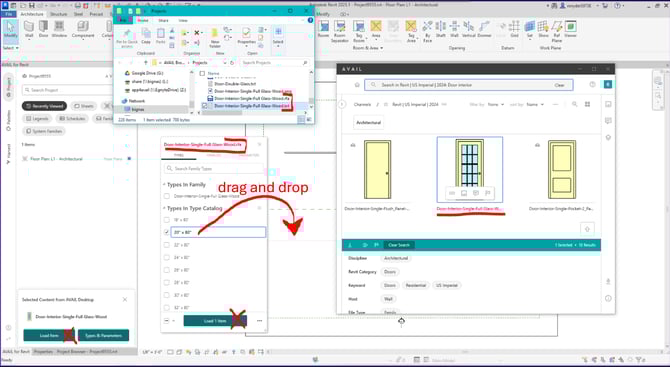
- Drag and drop it directly into Revit (see the image below).
Please advise: When dragging and dropping into Revit, Revit may or may not respond, depending on content type and where you drop it.
Example: if you drag a drafting view onto a plan view, Revit will not respond.
Drop drafting views only on Sheets.
After the drag and drop, types from the type catalog are shown in the AVAIL popup dialog.
-
From the AVAIL dialog, pick the type you want to place, then drag and drop that type from the dialog into Revit
That type only, the one you dragged, is loaded into Revit while AVAIL puts you into placement mode.
Note: You'll find yourself in Revit placement mode only if you're in a Revit tab that accepts the element type you dropped.
Example: To place a door, you have to be in a Revit view tab.
Summary:
Use AVAIL as a picker of things in your AVAIL resources that are not yet loaded into Revit, and drag and drop into Revit to load and place in one step.
The green load button is optional. Where it makes sense to do so, select the types you'd like to load, then click the Load button. AVAIL makes pre-loading optional and up to you.
A Related Note: Type catalog .txt files should sit in the source network folder along with families of the same name. Revit (and AVAIL) read the .txt type catalogs from where they are on the network. AVAIL even brings them along automatically into Host in Cloud AVAIL channels.
There is no need to index the .txt files into AVAIL. If you do, they are redundant. AVAIL and Revit make no use of AVAIL-indexed type catalog txt files.