AVAIL Desktop
Download Release Notes:
AVAIL Desktop 5.8.4 (August 31st, 2026)
- A new Content Submissions interface to manage content submissions and QA/QC review.
- Publish (Approve) or Decline Submissions from the Submissions page in the AVAIL Desktop.
- Ability to download submitted content, then 'Load' or 'Edit in Revit' from the AVAIL for Revit add-in.
- Ability to create a +New Content Submission from the AVAIL Desktop.
- New Content Submission Roles 'Submitter' & 'Reviewer,' which can be assigned to User Groups.
- A new Content Window that now includes the Content Preview, Related Content, and Content Notes.
- Ability to +Add Note to content.
- New Settings interface to manage Note Labels, Related Content Categories, and Application Mappings.
- Support for Multiple Content Previews with ability to upload a file or URL as a custom content preview.
- New "Cache Settings" to Settings dialog to Clear Browsing Data and
- Clear Downloads.
- Per-Channel Revit Versioning.
- Fixed drag and drop of post-downloaded Related Content items to AVAIL for Revit.
- Fixed bug where Copy/Move of Content could result in missing Thumbnail.
- Updated Splash Screen.
- Persistence of keycard sizes when displayed in Grid layout.
AVAIL for Revit (Project Navigator + Harvest)
Download Release Notes:
AVAIL for Revit 5.8.5 (September 9th, 2026)
- Ability to right-click on Elements in a project file and 'Create Content Submission'.
- Harvest Change Tracking:
- When enabled, Harvest will record Content Activity (what was changed and who changed it) in a Container File. Content Activity will live with the content and be visible in Harvest.
- Harvest Difference Engine:
- Identifies when an Element is changed in a Container File compared to what exists in the library. Leverages an LLM to generate technical notes about what changed. Technical Notes are recorded in the Content Activity history.
- Added ability to harvest Detail Views and load "Reference Details."
- Added ability to replace an existing View Template on load.
- Support for generating PDF Content Previews through Harvest for Drafting Views.
- Ability to Harvest a Channel for High-Quality Images of Revit Families.
- Display of Materials in Project Navigator list. Adds ability to perform Content Submission on Materials.
- Added new Double Click navigation to display Properties for View Templates and Materials in Harvest tab.
- Added display of properties for View Templates and Materials on drag and drop.
- Fixed potential issue with Types & Parameters window going off-screen.
- Better handling of double-clicked Harvested Content from the AVAIL Desktop.
- Added a Get Started message to Harvest tab for non-Harvest registered projects.
- Hide construction lines and other elements to improve preview generation for 2D families.
- Modified view template replacement to also replace templates in view family types.
- Implemented check to exclude primary title block while copying Sheets.
AVAIL for AutoCAD & Civil 3D
Download Release Notes:
AVAIL for AutoCAD & Civil 3D 5.2.1 (July 13th, 2026)
- Fixed insertion and placement of Annotative Blocks to support annotative scaling.
Unsure what version of AVAIL you have installed?
Follow these steps to find out:
1. In the AVAIL Desktop, click on your name in the upper right corner of the screen, then select About.
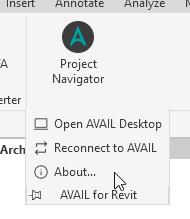
2. In Revit, select the Add-ins tab > AVAIL for Revit dropdown > About.
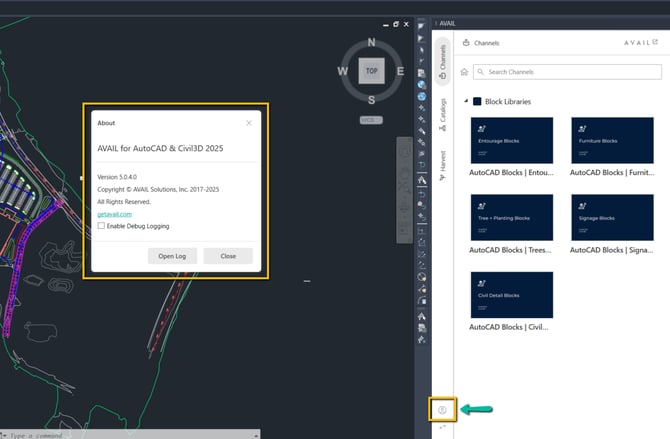
3. In AutoCAD & Civil 3D, select the User Profile button at the bottom of the add-in panel, then select About.