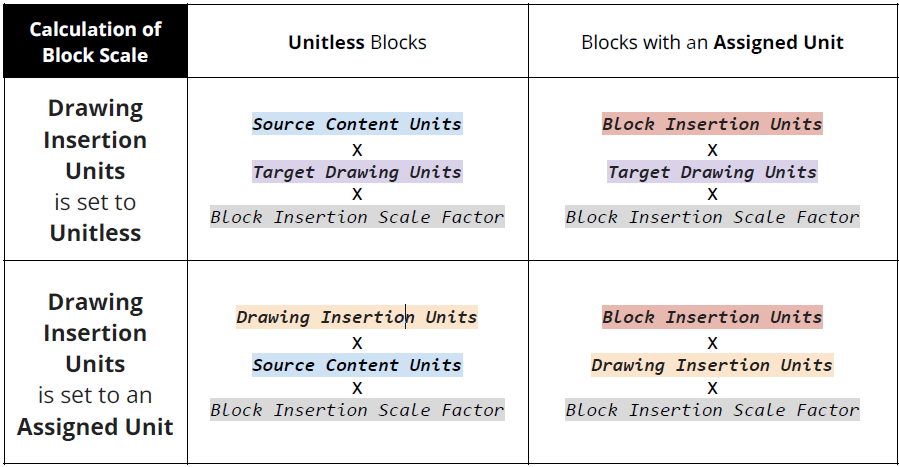
Block Insertion Scale Explanation
Much of the information here is a modified version of Autodesk’s AutoCAD Help Article: About Block Units and Insertion Scale. This article is meant to help clarify how the scaling of a block during insertion is calculated, depending on whether a block or drawing has an assigned unit of measurement.
- Block Insertion Units - The Units stored on the Block Definition
- Drawing Insertion Units - The Units at which blocks and drawings are scaled when inserted into the current drawing. This can be changed with the command -UNITS or via Menu > Drawing Utilities > Units > Insertion scale section
- Source Content Units - The Units override value to be used when the block or drawing being inserted is Unitless. This can be changed via Menu > Options > User Preferences > Insertion Scale section > Source content units
- Target Drawing Units - The Units override value to be used when Drawing Insertion Scale is set to Unitless. This can be changed via Menu > Options > User Preferences > Insertion Scale section > Target drawing units
- Block Insertion Scale Factor - Additional scale factor applied to the block or drawing during insertion after being scaled based on its assigned units of measurement and the Drawing Insertion Unit of the current drawing. In other words, this is controlled by the user while it is being inserted (if allowed to prompt for scale).